Automated trading has transformed the way traders participate in financial markets. Instead of manually placing trades and monitoring charts constantly, many traders now rely on automated systems that execute strategies automatically.
Platforms like TradingView allow traders to analyze markets, build strategies, and generate alerts when trading conditions occur. However, these alerts typically require manual execution unless they are connected to automation tools.
This is where automated trading systems come into play.
Automated trading allows traders to convert signals into real trades automatically. Instead of manually placing orders, the system executes trades based on predefined rules.
For beginners, automated trading may seem complex at first. However, modern automation platforms have made it easier than ever to create automated strategies without coding.
In this guide, we will explain how automated trading works, how beginners can get started, and how traders can automate strategies using TradingView alerts and webhook automation.
What Is Automated Trading?
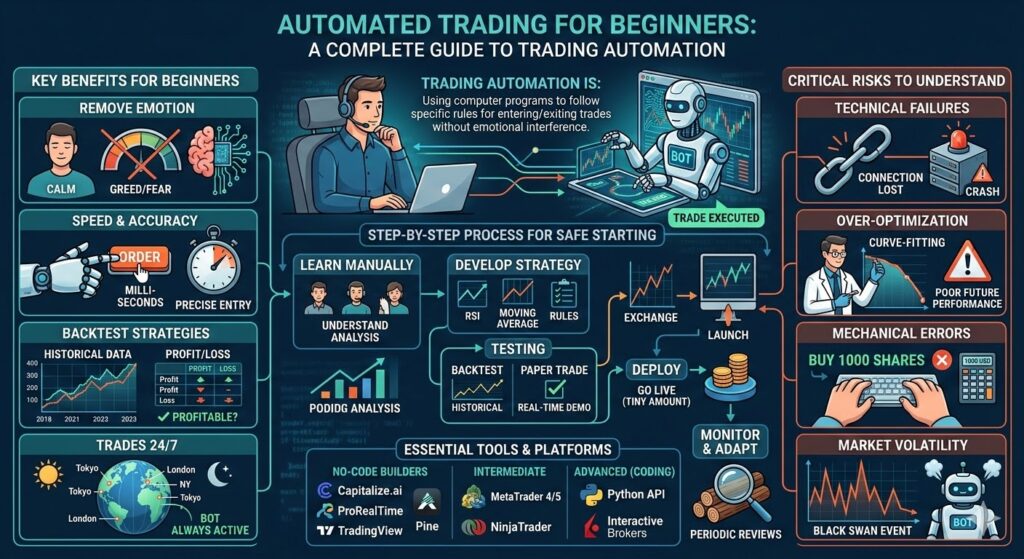
Automated trading refers to using software to execute trades automatically based on predefined rules.
Instead of manually analyzing charts and placing trades, traders create strategies that generate signals when certain conditions occur. These signals are then executed automatically by an automated system.
A typical automated trading workflow looks like this:
Trading Strategy
↓
Signal Generated
↓
Automation Platform Receives Signal
↓
Trade Executed Automatically
Automated trading systems allow traders to remove manual execution from the trading process.
Why Beginners Are Interested in Automated Trading
Many beginner traders are interested in automated trading because it offers several advantages.
Eliminating Emotional Trading
One of the biggest challenges in trading is controlling emotions.
Automated trading removes emotional decision-making by executing trades according to predefined rules.
Faster Trade Execution
Automated systems can execute trades instantly when signals occur.
Manual trading often introduces delays that can reduce strategy performance.
Consistency
Automated trading ensures strategies are executed exactly as designed.
Time Efficiency
Automation allows traders to run strategies without watching charts all day.
How Automated Trading Works
Automated trading systems rely on signals and execution infrastructure.
The automation pipeline typically looks like this:
Trading Strategy
↓
Signal Trigger
↓
Webhook Signal Sent
↓
Automation Platform Processes Signal
↓
Broker Executes Trade
In this architecture:
- Strategies generate trading signals
- Automation platforms interpret signals
- Broker APIs execute trades
Automation platforms act as the bridge between signals and broker execution.
How Beginners Can Start Automated Trading
Starting automated trading is easier today than ever before.
Follow these steps.
Step 1 — Choose a Trading Platform
Many traders use TradingView to build strategies and generate alerts.
TradingView provides powerful charting tools and indicator libraries.
Step 2 — Create a Trading Strategy
A trading strategy defines when to buy or sell.
Examples include:
- moving average crossovers
- RSI signals
- breakout strategies
Strategies can be created using indicators or Pine Script.
Step 3 — Generate Trading Alerts
Once a strategy generates signals, alerts can notify traders when conditions occur.
Alerts can also send webhook signals to automation platforms.
Step 4 — Connect an Automation Platform
Automation platforms receive trading signals and execute trades automatically.
Platforms like PostingTrader allow traders to automate TradingView alerts without coding.
These platforms convert webhook signals into broker orders.
Step 5 — Connect a Broker
Automation platforms connect directly to broker APIs.
When signals are received, the platform sends orders to the broker automatically.
Benefits of Automated Trading
Automated trading provides several advantages.
Speed
Automated systems execute trades immediately after signals occur.
Strategy Consistency
Strategies are executed exactly as designed.
Continuous Trading
Automated systems can operate 24 hours a day.
Scalability
Traders can run multiple strategies simultaneously.
Risks of Automated Trading
Although automation offers powerful benefits, traders should understand potential risks.
Strategy Risk
Poorly designed strategies can produce losses.
Always backtest strategies before automation.
System Reliability
Automation platforms must operate reliably to execute trades correctly.
Risk Management
Automated trading systems should include risk controls such as:
- stop loss levels
- position sizing
- maximum risk limits
Best Practices for Automated Trading Beginners
Beginners should follow several best practices when starting automated trading.
Backtest Strategies
Test strategies using historical data before running automation.
Start With Small Capital
Begin with small position sizes while testing strategies.
Monitor Performance
Even automated systems should be monitored regularly.
Use Risk Management
Always define stop losses and risk limits.
Example Automated Trading Workflow
Here is a simple example of how automated trading works.
Strategy detects moving average crossover
↓
TradingView alert triggers
↓
Webhook sends JSON signal
↓
Automation platform receives signal
↓
Broker executes trade
This process can occur in seconds.
FAQ
Is automated trading good for beginners?
Yes, automated trading can be beneficial for beginners because it removes emotional trading and ensures strategies are executed consistently.
Do you need coding skills for automated trading?
No. Many modern automation platforms allow traders to automate strategies without coding.
Can TradingView automate trading?
TradingView generates alerts, but automated trading requires connecting alerts to automation platforms that execute trades on brokers.